
 Over the past 12 years, I’ve gotten my office to run like a well-oiled machine, operated by a top notch office staff and fueled by the various office systems I developed myself. These included a tickler system for lab and radiology results, a patient chart organized so that I could retrieve whatever information I needed in an instant, patient information sheets I’d written myself, and, if you’ve been reading this blog for awhile, you already know about my little system for keeping track of return phone calls. It was mine, it worked for me, and gosh darn it, I liked it.
Going to an electronic medical record meant chucking all that away and starting from scratch using someone else’s system. It wasn’t easy.
It’s not as if I hadn’t known it was coming. I was on the implementation committee for 6 months prior to the go live date, and worked with the developers to customize and learn the system.
But that didn’t help as much as I had hoped when go-live finally came, the patients were streaming in, charts were backing up uncompleted and my computer inbox was crammed with lab results and patient calls and refills requests and staff messages.
To say I was stressed would be an understatement.
The hardest part was letting go of my old ways and trusting the new system to work for me. The good thing was that I did not entirely trust it, and so identified some bugs that needed fixing before they impacted the quality of care and the bottom line.
Things are getting better and better every day, and overall I would say the new system has more advantages than disadvantages. Results come back in real time, consult reports are available online, and I can retrieve a patient’s record from anywhere as long as I have my laptop and a good connection. The biggest plus is that I get to leave the office earlier, because I can do my chart work from home instead of staying at the office till 7 pm every day.
For those of you considering or about to undergo a similar conversion, I’ve compiled a list of tips for making the process go more smoothly. Some of these things we did right from the get-go, others we discovered during the implementation itself, and some are things no one told us that we wished we’d known beforehand. I hope it is helpful for those of you about to undergo a similar conversion.
TIPS FOR A SMOOTH EMR CONVERSION
- Cut back your volume
I recommend that you cut visit volume by 50% for the first month, then increase to 75% for the next month, then back to full volume by three months. Then be prepared to be swamped, because the first 3 months at full volume will be extremely difficult – count on working extra hours to keep caught up. It takes at least 6 months to a year to get up to speed with a new system. Which leads me to item 2… - Keep your Life Simple
Don’t schedule any major changes or take on any major commitments for at least 6 months. That includes getting a grant or a chapter written, writing a new lecture with slides, planning a wedding, undergoing childbirth or taking that big trip to Africa. You are about to change your day-to-day life drastically. Do not underestimate how stressful this will be, both at work and at home. - Keep the paper reports for awhile
Do not shut off the flow of paper laboratory and radiology reports until you are 100% sure that all test and radiology results are coming back to your online system, and that the system for tracking unresolved reports is working.We did this, and found that by 6 weeks we were able to turn off the paper laboratory systems, probably because they had been printing directly to our office printer for a few years, and we had already worked out the bugs.At 3 months we are still not 100% reliable with radiology report feeds, so we continue to receive paper reports for all radiology tests ordered. This is where a good part of the additional work hours predicted in item 2 arises. The dual system will drive you crazy reconciling what is back and what is not. But if you don’t do it, something will slip through the cracks, I promise. - Ask your patients to do some of the work
Have all patients complete a new patient intake form that includes past medical, surgical and family history, meds, referring docs, etc. (Some systems are designed to let patient enter this information directly, ours is not.) Use this to complete the historical sections of the online chart, or scan it in somewhere easily retrieved at every visit. It is much faster that trying to review the old chart and catch all your patient’s history that way. You should still review that chart to be sure you got it all, but that part goes quickly.If you have a good nurse, PA or NP, this is a great role for them. But be sure they know what they are doing, since you will be the one liable for missed information. - Don’t forget allergies
Make sure the allergies section of the EMR is completed at the first online visit. - Don’t give up your old chart too soon
Keep your paper chart until you have seen the patient at least once electronically, and don’t give it up until you are comfortable that all the historical data you need to take care of the patient has been electronically entered. Not all conversions will have this option, and it is more budensome on your staff, but if you can, do it.The reason is simple – it just takes much longer to skim through a scanned chart than a live one. I learned this one the hard way, because I had my all my old charts scanned in at go live. I hate having to review my old charts as PDF files. - Take advantage of computer shortcuts
Learn keyboard shortcuts early in the implementation. The keyboard is always faster than the mouse. And use macros, smart texts and smart phrases as much as possible.But be wary of any shortcut that auto-completes the online form. The last thing you want is data being entered for elements of the exam you did not actually perform. - Do a compliance audit early on in the implementation
You don’t want to find out 6 months in that there are problems with documentation or coding resulting from the new system. By doing chart reviews early on, we discovered that certain CPT codes needed to be updated or added to the online system and that some very minor changes in the visit template led to better charge capture and less errors. - Work with your IT team
– Give feedback early and often to the development and implementation team. They want and need it in order to customize the system properly to your practice. If you can, get on the initial development team, so that your input is heard from day 1.- Get to know the physician IT team leader and give your feedback directly to that individual on any issue that you feel impacts quality of care. The IT support team may not have the medical background to reliably distinguish simple technical issues from those that impact quality of care and need to be sent up the ladder. Such issues are probably affecting other practices as well, and the physician IT team leader needs to know about them.- Be patient with the IT team. They did not design the system, they are not perfect, and they are probably working their asses off to meet timelines and deadlines.- Keep a list of every issue you identify and refer to the IT team, then meet regularly with them and get follow up on every issue. Sure, it’s their job to do that, but they are probably working to implement more than one site at a time and things can get lost. Remember that ultimately it is your practice and your tail if things go wrong, so take responsibility from day 1 for getting it right. - Ergonomics, ergonomics, ergonomics.
You will now be spending enormous amounts of time at the computer. (Unless you have a blog, in which case you already know this.) Sit up straight, get that screen at the right level, and that mouse where it won’t hurt your wrist. Hopefully you will have you exam rooms set up so you don’t have to turn your back to the patient to access their chart online. - Keep your options open
Don’t tie you down to a single workstation before you really find out how your work flows during office hours. Make sure there are plenty of places where you can go to complete a chart or print out a prescription before a patient leaves the office.Right now, it is still faster for me to leave the room and complete the chart in my office, because the patients have to get dressed and the room turned over to another patient. Once I get faster at inputting data directly online in the exam room while I am talking to the patient, I expect this may change. But at least I have options, and that means I can keep patient flow moving. - Monitors: the bigger, the better
Get a monitor screen big enough to easily read a full page pdf image. If you are viewing old charts and outside records as PDF files, it is much faster to page through a full screen view than to have to scroll down every page to get to the bottom because the full page view is too small to read. - Handling the residual paper
You’ll still be moving a fair amount of paper through your office, such as old records, snail mail correspondence and outside radiology and lab reports. So get the fastest scanner your budget allows. Scanning is time consuming and staff intensive, so it will be money well spent up front.Don’t let the office-based scanning get behind. Fit scanning into the patient visit work flow as much as possible. If you batch it, it will pile up. Trust me on this. Farm out large amounts of scanning (like old charts) to a reliable vendor.Get a shredder for the paper you will need to discard after scanning. Better yet, subscribe to a shredding service. - Schedule a massage for week one
No explanation necessary. This will help immensely with the next item, which is.. - Be nice
The conversion is just as hard for your staff as is it for you. Trust me. You are all on the same side. Getting angry, frustrated and annoyed helps no one, so get over yourself and just be nice.Which leads to my final, and most important piece of advice… - Bring cookies
During our EMR implementation, Eric, our IT support guy, brought cookies every single day. We learned to love him for it. Whenever I stormed into his office, annoyed and frustrated, he’d offer me a cookie. I think it was those cookies which made our conversion a success. (Luckily I didn’t storm into his office more than once a day, usually around 4 pm…)
Here’s an easy cookie recipe that you can make and bring in to your office staff and the IT team when you decide to go electronic. It will make things go more smoothly, I promise.
—————————————————————————————————-
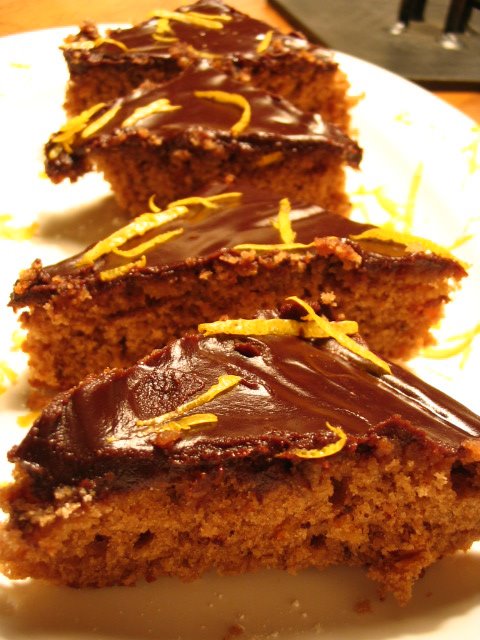 CHOCOLATE ORANGE TRIANGLES FOR AN EMR CONVERSION
2 oz.unsweetened chocolate, in pieces
2/3 cup all-purpose flour
1 stick unsalted butter, melted
2 large eggs
½ cup sugar
½ cup orange marmalade
1 tsp vanilla extract
¼ tsp salt
½ tsp baking powder
1 oz. Semisweet chocolate, in pieces
Grated orange zest for garnish
Chocolate glaze (recipe follows)
Preheat oven to 350 degrees. Pulse the unsweetened chocolate with the metal blade of a food processor 4 times, then process until finely chopped, about 1 minute. With the motor running pour the hot butter through the feed tube in a slow, steady stream and process until the chocolate is melted, about 30 seconds. Scrape down the work bowl.
Add the eggs, sugar, marmalade, and vanilla and process until combined, about 5 seconds. Add the flour, baking powder, salt and semisweet chocolate and pulse until combined, about 5 times.
Pour into a greased 8-inch square baking pan and bake in the preheated oven until a cake tester comes out clean, about 30 minutes. (watch carefully). Cool on rack.
Spread with the chocolate glaze and refrigerate until set, about 30 minutes. Sprinkle with the orange zest, cut into 2-inch squares, and halve the squares diagonally. Makes 32 cookies.
Chocolate Glaze
2 oz semisweet chocolate, in piece
2 tbsps. Unsalted butter
2 tbsps. Milk
1/4 cup confectioner’s sugar
1 tsp. Vanilla extract
Pulse the chocolate with the metal blade 4 times, then process until chopped finely, about 1 minute.
Combine the butter, milk, and sugar in a small saucepan and bring to a simmer, about 4 minutes. Stir in the vanilla. With the motor running pour through the feed tube in a slow, steady stream and process until the chocolate is melted, about 30 seconds.
(Recipe from Irene, who may have gotten it originally from Cook’s Illustrated, I’m not sure..)
Category: Second Opinions Food